
In today’s fast-paced digital economy, website and application performance directly impacts revenue, user retention, and enterprise scalability. For businesses operating complex database management systems, enterprise resource planning (ERP) suites, high-traffic e-commerce engines, or intensive Windows-native workloads, hosting on shared or virtualized environments often leads to performance bottlenecks.
Choosing high-spec Windows Servers in Europe provides organizations with the dedicated hardware computing power, low-latency network routes, and strict data sovereignty compliance required to power modern digital operations.
This definitive guide explores why dedicated Windows server hosting delivers unmatched speed, reliability, and security, how to optimize your Windows Server environment for peak computing efficiency, and how hosting in European data hubs accelerates performance across global markets.
Understanding Dedicated Windows Server Architecture
Unlike shared hosting or multi-tenant Virtual Private Servers (VPS) where resources like CPU cycles, RAM, and disk I/O are shared among multiple users, a dedicated server provides an entire physical machine exclusively to your organization. When coupled with Microsoft’s enterprise-grade operating systems—such as Windows Server 2019 or Windows Server 2022—you unlock direct access to hardware components without the interference of a hypervisor footprint or noisy neighbors.
The Core Architecture of Windows Server OS
Windows Server is engineered to handle massive throughput and multi-threaded processing. Key features include:
- Advanced Storage Spaces: Delivers resilient storage virtualization, allowing administrators to group drives into storage pools and create high-speed tiering.
- Resilient File System (ReFS): Designed for maximum data availability, efficient scalability for large datasets, and built-in data corruption detection and repair.
- Integrated Server Management: Tools such as Windows Admin Center and PowerShell offer comprehensive control over hardware configurations, automated tasks, and network protocols.
When deploying high-performance enterprise workloads, deploying Windows Servers in Europe ensures that your core OS operates on dedicated hardware hosted within world-class data center facilities.
Why Raw Performance Matters for Windows Workloads
For resource-intensive applications, performance is not merely a preference—it is an operational requirement. Windows-based business applications rely heavily on single-thread CPU speed, rapid memory access, and sequential and random disk read/write throughput.
Eliminating Hypervisor Overhead
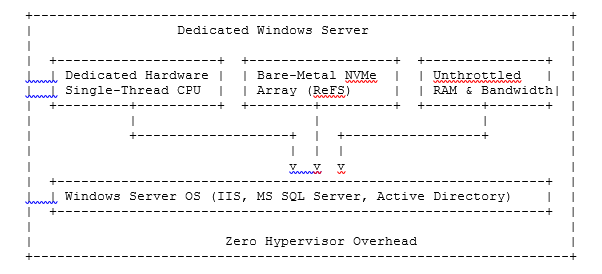
While virtualization platforms like Hyper-V and VMware offer flexibility, they introduce a small abstraction layer (overhead) between the application and the physical CPU/RAM. In a bare-metal dedicated setup:
- Direct Processor Execution: Every core of your Intel Xeon or AMD EPYC processor is fully allocated to your operating system tasks.
- Unthrottled Memory Access: RAM access features lower latency since there is no memory ballooning or dynamic allocation management across multiple tenant instances.
- Maximum Storage I/O: NVMe drives connected via PCIe buses deliver millions of IOPS directly to your databases without virtual disk adapter translation delays.
Key Performance Benefits of Dedicated Windows Servers
Deploying your mission-critical applications on dedicated Windows infrastructure offers several clear performance advantages:
1. Microsoft SQL Server Acceleration
Microsoft SQL Server is one of the most database-intensive enterprise software systems available. To achieve real-time query execution, SQL Server requires extreme memory bandwidth and fast disk read/writes. Dedicated Windows servers permit deep optimization through direct memory allocation, temporary database offloading to blazing-fast NVMe storage drives, and custom CPU affinity configuration.
2. High-Density IIS Web Hosting
Internet Information Services (IIS) hosted on dedicated hardware can easily manage tens of thousands of concurrent WebSockets and HTTP/3 connections. Without shared bandwidth limits or CPU capping, your web applications render dynamically with sub-millisecond backend execution times.
3. Seamless Remote Desktop Services (RDS) & VDI
For organizations operating remote workforces, streaming desktop sessions via Remote Desktop Protocol (RDP) demands consistent CPU frequency and GPU acceleration. A dedicated Windows environment guarantees that employees experience zero input lag during daily tasks, CAD applications, or data analysis workflows.
4. Optimized Active Directory & Domain Controller Performance
In enterprise network configurations, authentication delays disrupt productivity. Dedicated servers hosting Active Directory Domain Services (AD DS) process authorization requests instantly across global branch offices.
Strategic Advantages of Hosting Windows Servers in Europe
The physical location of your infrastructure plays a major role in user experience and legal compliance. Deploying Windows Servers in Europe positions your operations within one of the world’s most connected digital ecosystems.
Centralized Connectivity and Low Latency
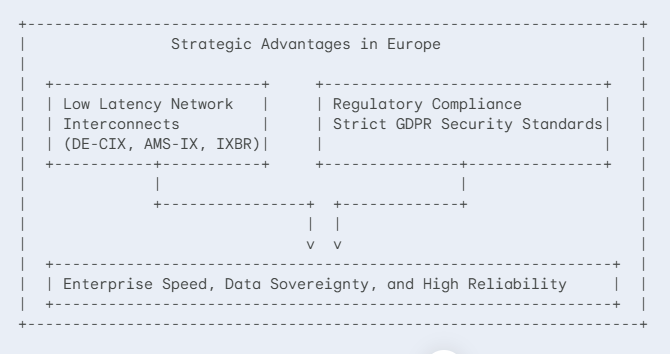
European internet exchange points—such as DE-CIX in Frankfurt, AMS-IX in Amsterdam, and LINX in London—are among the largest peering facilities on earth. Hosting your infrastructure within European data centers ensures:
- Ultra-Low Ping Times: Deliver sub-20ms latency to millions of end users across the UK, Central Europe, Eastern Europe, and Scandinavia.
- Direct Transatlantic Cables: Quick routes across the Atlantic to North America and southeast through Turkey and the Middle East.
- Redundant Tier-3 & Tier-4 Connectivity: Multiple upstream transit providers ensure 99.999% network uptime for critical applications.
Strict Data Privacy and GDPR Compliance
Data security and regulatory compliance are top priorities for modern enterprises. Selecting Windows Servers in Europe helps businesses fulfill stringent regulatory standards:
- GDPR Compliance: Storing European customer data locally guarantees compliance with General Data Protection Regulation requirements, protecting your business from heavy compliance fines.
- Data Sovereignty: Physical control over where your databases reside prevents unauthorized access under foreign jurisdiction laws.
- ISO/IEC 27001 Certification: Leading European data centers maintain top-tier physical and cybersecurity standards, complete with biometric access control, 24/7 monitoring, and redundant power infrastructure.
Windows Server OS Versions: Choosing the Right Edition
Selecting the appropriate operating system version is vital for hardware compatibility, security updates, and software integration.
| Feature / Technology | Windows Server 2022 |
| Secured-Core Server Protection | Built-in Hardware Security |
| Transport Layer Security | TLS 1.3 Enabled by Default |
| Storage Tiering Acceleration | Enhanced NVMe Caching |
| Hotpatching Support | Updates Without Reboots |
| Hybrid Cloud Integration | Direct Azure Arc Connectivity |
Windows Server 2022: The Modern Standard
Windows Server 2022 brings advanced security layers, cloud-hybrid integration, and performance improvements to high-spec hardware:
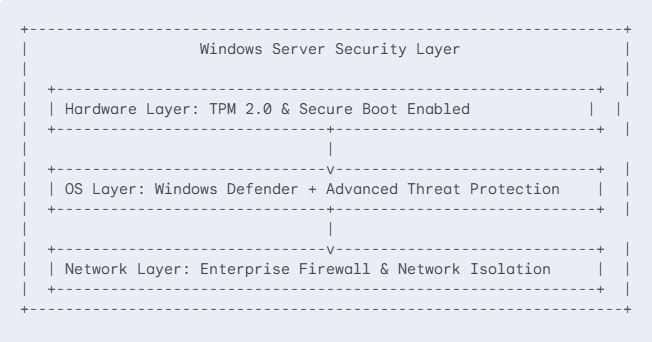
- Secured-Core Server: Leverages TPM 2.0 hardware root-of-trust to protect against firmware-level exploits.
- TLS 1.3 by Default: Faster, safer encrypted web traffic out of the box.
- Storage Migration Service: Simplified migration paths from legacy systems directly into modern hardware configurations.
Windows Server 2019: Time-Tested Stability
For enterprises reliant on legacy line-of-business applications, Windows Server 2019 remains a reliable operational base. It delivers robust containerization capabilities through Kubernetes and strong storage performance via Storage Spaces Direct.
Hardware Optimization Strategies for Dedicated Windows Servers
To extract the maximum speed out of your physical hardware, specific administrative tuning should be applied post-deployment.
1. CPU Power Plan Configuration
By default, Windows Server OS operates under a “Balanced” power consumption model. While energy efficient, this introduces micro-delays when the CPU scales up frequency in response to sudden load spikes.
- Action: Change the High Performance Power Plan setting via Control Panel or run the following PowerShell command:
powercfg /setactive 8c5e7fda-e8bf-4a96-9a85-a6e23a8c635c
This keeps processor cores at their base or turbo frequencies continuously, eliminating CPU state switching latency.
2. Network Stack Tuning for High Throughput
Modern dedicated servers come equipped with 1Gbps, 10Gbps, or 40Gbps network interfaces (NICs). To fully leverage high bandwidth:
- Enable Receive Side Scaling (RSS): Distributes network processing across multiple CPU cores rather than bottlenecking Core 0.
- Enable Jumbo Frames: Increase MTU from 1500 to 9000 bytes for internal database replication networks to reduce CPU packet processing overhead.
- Configure TCP Window Auto-Tuning: Ensure maximum bandwidth utilization across long-distance network connections.
When hosting Windows Servers in Europe, optimizing these NIC settings ensures that your server pushes high bandwidth across major European IXPs.
3. Disk Alignment and File System Allocation Units
For high-speed NVMe and SSD storage arrays running enterprise databases:
- Format SQL Server data drives using a 64KB Allocation Unit Size (Block Size) rather than the standard 4KB default. This aligns drive writes with SQL Server’s internal extent storage model, boosting read/write speeds by up to 30%.
Use Cases: Who Needs a Dedicated Windows Server in Europe?
Different industries require varying computing configurations. Below are common enterprise deployment scenarios for Windows Servers in Europe.
Enterprise E-Commerce Platforms
E-commerce businesses experience seasonal traffic surges during sales events. A dedicated server hosting ASP.NET Core applications and MS SQL backends ensures:
- Zero application crashes under extreme shopping loads.
- Instant checkout processing and fast payment gateway callbacks.
- Fast page load times, directly boosting SEO search rankings and conversion rates.
Financial & iGaming Operations
Financial platforms, forex trading systems, and modern gaming operators require minimal ping to minimize slippage and deliver real-time data sync. Deploying Windows Servers in Europe near major financial centers ensures ultra-low network latency to key banking hubs.
SaaS Providers and Software Vendors
Software-as-a-Service (SaaS) providers running Windows-native stacks require multi-tenant isolation, database encryption, and consistent compute speeds for their subscribers. Bare-metal hardware guarantees that resource usage by one tenant will never impact the performance of another.
Security Best Practices for Windows Dedicated Infrastructure
High performance must be backed by strict infrastructure security. Windows Server offers deep security integration when properly configured.
1. Hardening Remote Management
Remote Desktop Protocol (RDP) is a common entry vector for brute-force cyber attacks. Secure your access points immediately:
- Change Default Ports: Shift RDP listening ports away from default port 3389.
- Enforce Network Level Authentication (NLA): Mandate user authentication prior to creating full RDP user sessions.
- Use VPN Tunnels: Never expose RDP directly to the open internet; force administrative access through encrypted WireGuard or IPsec VPN tunnels.
2. Storage Encryption via BitLocker
Protect sensitive corporate data at rest using drive-level BitLocker encryption. Modern dedicated CPUs feature hardware-accelerated AES-NI instruction sets, ensuring that data encryption occurs with negligible CPU impact.
3. Automated Patch Management
Utilize Windows Server Update Services (WSUS) or automated management software to schedule security patches during off-peak traffic hours, ensuring your operating system stays protected against emerging exploits.
Comparing Hosting Environments: Dedicated vs. VPS vs. Cloud
Choosing the right hosting infrastructure depends on balancing budget, required performance, and scalability goals.
| Feature | Dedicated | VPS | Public Cloud |
| Hardware Access | Bare-Metal | Shared | Virtualized |
| Performance | Maximum/Stable | Variable | High/Costly |
| Data Sovereignty | Full Control | Moderate | Multi-Region |
| Resource Limits | Uncapped | Capped | Pay-per-use |
| Hypervisor Overhead | None | Significant | Slight |
Dedicated Servers vs. Virtual Private Servers (VPS)
While VPS solutions are cost-effective for smaller projects, shared hypervisor resources lead to CPU throttling and storage bottlenecks during high-traffic spikes. Dedicated servers guarantee 100% hardware allocation exclusively to your enterprise tasks.
Dedicated Servers vs. Public Cloud Infrastructure
Public cloud providers offer rapid scaling, but costs quickly compound when running predictable, 24/7 high-memory enterprise applications. Dedicated servers offer flat-rate pricing, unmetered network pipelines, and higher compute output per dollar spent.
Key Factors When Selecting Your Windows Server Hosting Provider
Selecting the right partner for hardware deployment requires assessing operational metrics beyond pure pricing.
Hardware Quality and Customization
Look for hosting providers offering modern server-grade components:
- Processors: AMD EPYC 7003/9004 series or Intel Xeon Scalable processors.
- RAM: ECC (Error-Correcting Code) DDR4 or DDR5 RAM to prevent system crashes from bit-flip errors.
- Drives: Enterprise NVMe drives operating in RAID 1, RAID 5, or RAID 10 configurations for data redundancy and high IOPS performance.
Tier-3+ Data Center Standards
Ensure your infrastructure is housed in enterprise-grade facilities featuring dual power feeds, diesel generator backups, precision cooling systems, and physical security measures.
24/7 System Monitoring and Support
Server hardware requires prompt technical support. Ensure your host provides round-the-clock hardware monitoring and fast, on-site component replacement guarantees.
Opting for high-performance Windows Servers in Europe provides your business with an optimal blend of fast connectivity, hardware power, and regulatory peace of mind.
Conclusion: Maximize Your Application Infrastructure Today
Uncompromising speed, zero noisy-neighbor degradation, robust Microsoft security integration, and full operational control make dedicated Windows servers the clear choice for demanding enterprise workloads.
By positioning your hosting infrastructure using high-performance Windows Servers in Europe, your platform gains low network latency across global business hubs alongside strict GDPR privacy compliance. Whether hosting massive database clusters, running enterprise resource software, or supporting high-concurrency web applications, dedicated bare-metal infrastructure provides the ultimate foundation for corporate growth.
Take full control of your server hardware, eliminate performance bottlenecks, and empower your organization with dedicated computing built for speed and reliability.